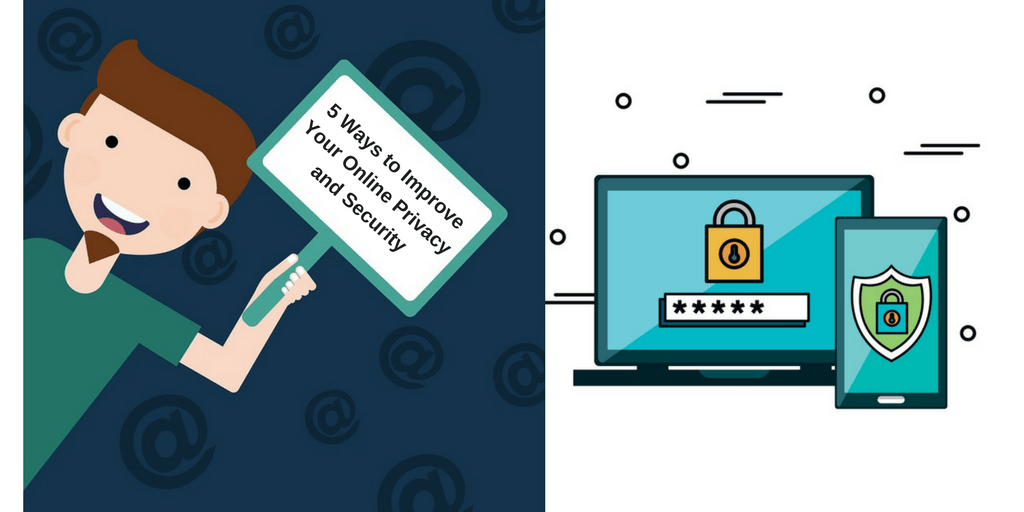
Five Steps You Can Take Right Now to Increase Your Privacy

You should care about your privacy online even if you think you have nothing to hide. A key aspect of privacy is being able to choose what information you share publicly and what is private. Would you want your bank account balance displayed for anyone to see? What about your medical history?

Encryption is a vital tool for protecting private communications online from unwanted eyes. We use it every day, often without even realizing it. But, encryption is not magic. If you want to better protect your privacy online, here are five steps you can take right now:

  1. Use End to End Encryption for all Messages: encryption-820x420End to End (E2E) encryption is a way to secure the messages you send via email or a messaging app so that they can only by read by those you intended to read it including your friends, bank, doctor, etc. Read the fine print – not all encrypted services are E2E. Use messaging apps that have E2E encryption (e.g. Signal, Wire). Encourage your friends and family to switch to an app that has E2E.  Remember that sending an unencrypted message is like sending a postcard. Anyone can read it and you wouldn’t even know. One popular method of setting up encrypted email is via Pretty Good Privacy (PGP). You can read how to do it at http://openpgp.org.
  1. Use a VPN: 1_ki9vH87FbtYJeQP29IM3fAA virtual private network (VPN) will encrypt your Internet traffic and send it through a server that physically sits in another location. It acts like a tunnel. This means that your Internet Service Provider (ISP) will no longer be able track your online activity, but will only see traffic coming in and out of the VPN.
  1. Use an SSL Browser Extension: post-image_file-Why-Using-SSL-Certificates-are-Important-for-Secure-Web-BrowsingMany websites can encrypt the information you send and receive, typically using a protocol called Secure Socket Layer (SSL). If you do your banking or shopping online, you may be familiar with SSL already. Many browsers will show a closed padlock symbol when a website is using the protocol. Browser plugins and extensions like the open-source HTTPS Everywhere will ensure that if a website offers an encrypted SSL connection, it will use it.
  1. Secure your Devices with 2-Factor Authentication:SecureDevice 2-Factor Authentication (2FA) is a way of providing additional reassurance that only you have access to your data. (For greater data security, you should use this with encryption.) With 2FA, two factors must be compromised to gain access, rather than just one. They should be different kinds of factors, such as one thing you know (e.g. a password or an answer to a security question) and something you have (e.g. a hardware 2FA device like a YubiKey). A YubiKey is almost like a car’s ignition key, but for your computer. It means you’ll need a small USB key, plus a username and password, to access your files or log in to your apps and services. You can even keep it on your key-ring.
  1. Change your Internet and Technology Habits: edad-tecnologica-1The methods above provide some specific ways to protect your data during certain online activities. However, they are only as effective as the person using them. Be aware of when you are being protected and when you aren’t. Shape your online activities and preferences towards safer options (e.g. use E2E and 2FA, turn privacy settings on, be deliberate about what you share). But, remember that no method offers perfect protection.


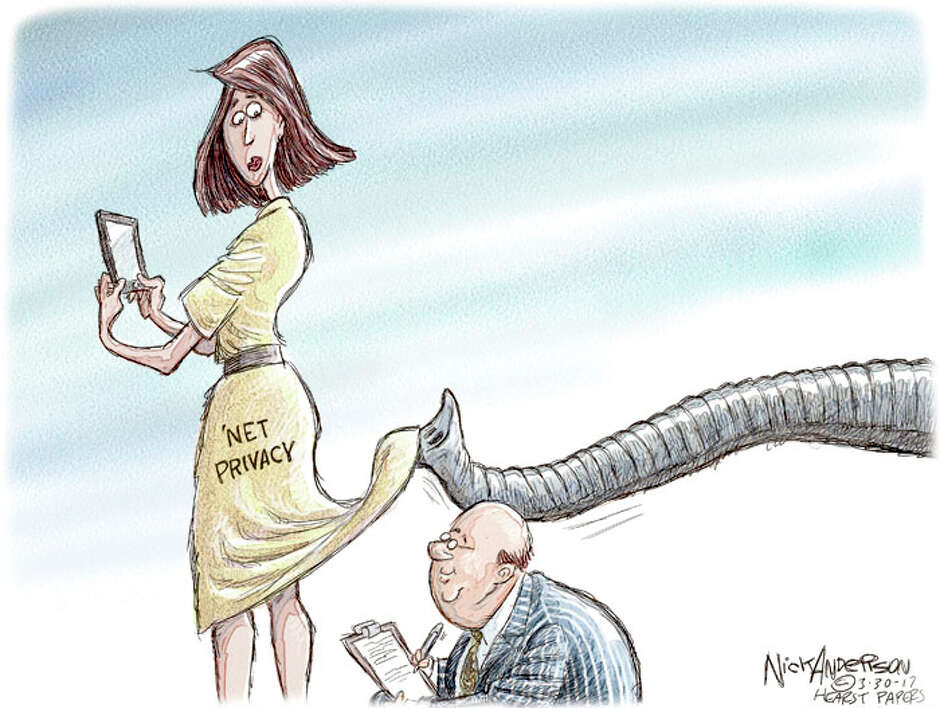
Loss of Internet Privacy Should Concern Business

Data from how you use the internet reveals almost everything about you, and soon I’ll have access to it.

President Donald Trump is expected to sign a bill allowing internet service providers to sell me a list of every website you’ve ever visited, how long you stayed on each site and other critical information that will me give insight into your psyche.

If I am really clever, I can use that information to write stories that will spark your interest and then place appealing advertisements next to those articles every time you log on.

That’s the best case scenario. The worst case is that I can crunch the numbers, identify you by name and then publicly humiliate you based on what websites you visit.

Congress passed this law to allow telecommunications companies to make billions from online advertising. Google and Facebook already make their billions by analyzing what you search for on the internet or how you behave socially, but your web use data is much more valuable.

Image result for LOSS OF INTERNET PRIVACY

The bill repeals rules that forbade internet service providers from sharing your web history and other critical data out of respect for your privacy. But internet service providers paid members of Congress a pretty penny to get those rule dropped.

From now on, every time you use the internet, a major corporation will be taking notes about how to use your data to make money.

This isn’t just about whether you watch cat videos or visit porn sites. The most frightening part is that the repeal of internet privacy protections is only the beginning of a process that will be more intrusive than any strip search or home invasion.

“There is tremendous business interest in harnessing the power of digital commerce,” said Bob Hedges, data privacy expert and lead partner in the management consultant firm A.T. Kearney’s Financial Institutions practice. “The need for privacy and data is only going to keep increasing .”

Image result for LOSS OF INTERNET PRIVACY

This legislation sets a precedent by declaring that the conveyor of your data owns it, not you. In a more connected world, when every electric device is connected to the internet, the effect could be profound and disturbing.

“If I am using a sensor to keep track of butter, milk and beer in my refrigerator and to order it for me, then it’s good that the grocer knows that and can send it to me,” Hedges said. “But does the grocer, or anyone really, have the right to sell  that information to my insurance company? Because then they would know the cholesterol level in my diet.”

People aren’t stupid, though. I don’t use Google’s email service because I don’t want that intrusion, and many Americans agree with me. That’s why Hedges warns that giving internet service providers this data will likely hurt companies that sell goods and services online by convincing many people to avoid the internet.

“What’s necessary to facilitate digital commerce is the confidence of the consumer that the data is secure and that the data is private,” he said. “What the relaxation of the regulations risks doing is undermining that privacy, which will ultimately undermine the confidence of the U.S. consumer.”

Image result for "LOSS OF INTERNET PRIVACY"

Every other developed country has recognized these risks to personal privacy and digital commerce and gone in the opposite direction. In Europe, Australia and the United Kingdom, to name a few jurisdictions, the data you generate belongs to you. No one can reveal it without your permission.

That seems fair to me. Google has almost a billion accounts for its Gmail service, where users know the company will give them free email in return for allowing the company to scrape their emails for data. That’s a trade they are willing to make.

People opt-in for Gmail, though, and most internet users don’t have a choice in service providers. And providers are not required to give users a choice of what data to sell.

Stripping away privacy protections is bad for consumers and bad for business. Unfortunately we’ll have to wait for widespread abuses before members of Congress wake up to their horrible mistake.

Five Ways to Prevent Data Leaks

The story still strikes fear into the hearts of IT departments: As many as 70 million credit- and debit card accounts were compromised in less than a month during the Target data breach. While Target’s internal security team was using all of the right protocols, it was an external contractor who ultimately provided the way in. No matter how locked down an IT department is, most breaches occur when a third-party provider is involved, allowing the leakage of critical data such as passwords or IP.

Any business running multiple cloud-based apps—and today, that’s most of us—runs a high risk of exposure through data leakage. Here are five ways to keep data protected, and secure this year.

1. Identify Critical Data

First, businesses must recognize how to identify their own critical data. This means being able to categorize what data is in need of the most protection and how to utilize data loss prevention (DLP) software to protect any sensitive information. Depending on industry, this could mean PHI, financial statements and blueprint or strategy checks.

Since DLP relies heavily on proper classification of information, organizations should actualize a data protection strategy, primarily targeting sensitive documents and their handling. This is a progressive strategy; you can’t tackle everything at once. First, classify types of data to the concise policies of your organization. Prioritize small modules and target key endpoints to provide employees with learning opportunities before wider deployment. Then take an objective review period for initial results.

2. Monitor Access and Activity

The next step in preventing data leakage is to closely monitor traffic on all networks. The ability to automatically discover, map and track what is deployed across your entire business infrastructure provides a picture of your network in real-time.

Because the average hacker conducts reconnaissance within a network for six months before actually breaching a system, businesses need to identify anomalous behavior before a breach occurs. Monitoring tools supervise access and activity, notifying administrators of red flags when an employee downloads, copies or deletes information.

A Data Activity Monitoring (DAM) solution can provide another layer of protection by detecting unauthorized actions. While a DLP’s focal point is on network and endpoints, DAM targets database activity. Using both solutions concurrently provides broader protection through the layered use of monitoring and alerts, and blocking suspicious users or activities remotely.

3. Utilize Encryption

If your business has not already done so, you should consider encrypting any private, confidential or sensitive information. While encryption is not impenetrable, it remains one of the best ways to keep data secure. A carefully implemented encryption and key management process renders stolen data unreadable and useless.

Enabling encryption across different points of your network—including data at rest and in transit—can provide significant protection from even the most advanced attacks. Businesses should enable a layered defense system through proactively monitored and managed encrypted networks.

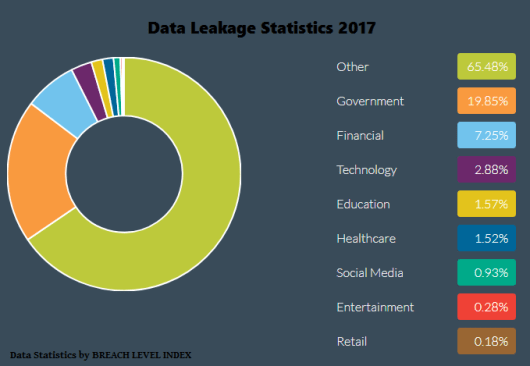
data-leakage-statistics-2017 (1)

4. Lock Down the Network

Being able to lock down your network needs to be be a primary focus of prevention efforts. With the rise of mobile technology, data leakage also is experiencing an uptick. While many employees are aware of the steps that must be taken to safeguard sensitive data, some simply do not recognize their practices as unsafe. This can be mitigated by frequent tutorials and practice testing of good practices.

5. Endpoint Security

Since data also leaves networks through exit points within IT infrastructure, businesses can more effectively manage data loss risk by choosing DLP solutions that monitor and act at these exit points. This allows IT staff to determine what confidential information is leaving and when and through what specific channel or device.

With the BYOD trend growing in businesses of all sizes, endpoint management needs to be an essential part of your company’s security. Securing BYOD has become much more difficult, due to both geography and the multitude of platforms that must be supported, but the placement of effective controls can enable companies to follow the movement of data.

Retaining central control with the ability to monitor personal devices connected to corporate networks allows holistic observations of your network. Without this endpoint protection, data breaches can go unrecognized for longer periods of time, exacerbating vulnerabilities.

Beyond the fundamental steps to secure data, such as network firewalls, intrusion prevention systems, secure Web gateways and endpoint protection tools, more effective threat response begins with advanced security monitoring, as previously mentioned. Employing effective security technologies, as well as implementing best practices, can go a long way in preventing data leakage.

A Multi-step Solution

The keys to preventing data leakage are manifold. Identifying critical data, monitoring access and activity with a combination of DLP or DAM solutions, utilizing encryption, retaining control of your network and using endpoint security measures all equal a fine-tuned and customizable program to protect your entire organization.

cloud_data-620x400

Invasion of Data Privacy on WWW

An informative blog about the importance of user’s data privacy

vulnerabilities3

A consistent finding reported in online privacy research is that an overwhelming majority of people are ‘concerned’ about their privacy when they use the Internet. Therefore, it is important to understand the discourse of Internet users’ privacy concerns, and any actions they take to guard against these concerns. A Dynamic Interviewing Programme (DIP) was employed in order to survey users of an instant messaging ICQ (‘I seek you’) client using both closed and open question formats. Analysis of 530 respondents’ data illustrates the importance of establishing users’ privacy concerns and the reasoning behind these concerns. Results indicate that Internet users are concerned about a wider range of privacy issues than surveys have typically covered. The results do not provide final definitions for the areas of online privacy, but provide information that is useful to gain a better understanding of privacy concerns and actions.

BUT HOW DO WE REALLY KNOW THAT WE ARE AT RISK OF HAVING DATA LEAKAGE?

Yup, you read it right. DATA LEAKAGE. We are now living in a 21st generation world and as the world grows, the technology which had sprouted for over a decade is also becoming stronger and stronger also. We couldn’t avoid the fact that most of our leisure time are spent in chatting, surfing the web and playing games. Most likely, some people are addicted in Facebook, Twitter and Instagram. Well, for me, I did noticed that people are more likely to be possessive of themselves. They tend to post pictures wherever they are. Mostly they take pictures during lunch or dinner then upload it to Facebook. But little do you know that you, yourselves are at a potential risk in data leakage? As you post your pictures, it undergoes different process in the technical servers in the web depending on what site are you uploading at. The servers then process your pictures and sends a lot of encrypted data to their main servers. I am not expert of this technicalities but somehow, I could give you advice on how to avoid these serious things together with my teammates.

Although it’s usually used in the context of data breaches in large companies and institutions, data leakage is a big threat for home users as well. It’s not me that’s saying it, but rather industry reports such as the 2015 Global Data Leakage Report.

leak

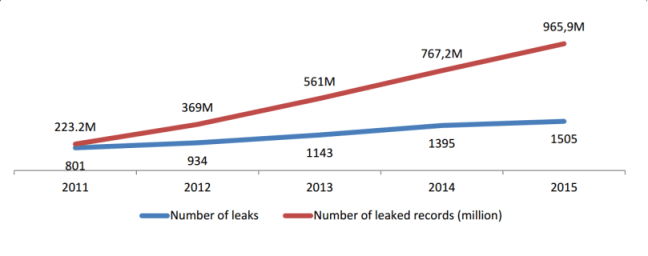
According to Heimdal Securities, there are almost 966 million people which are vulnerable of exposing their data and information to unknown sources or anonymous users swindling out in the web.

In the simplest way, a data leak happens when you lose sensitive information and this loss puts you at risk, whether personally, professionally, emotionally or financially.

Although the term may be used interchangeably with data loss, you should know that data loss sometimes refers more to data that has been destroyed or corrupted. Naturally, the two terms have one thing in common: the fact that the data either ended up in the wrong hands or was irreversibly damaged.

DIFFERENT WAYS A SIMPLE USER COULD BE A POTENTIAL RISK IN THE LOSS OF DATA

1. The browser is where most of the confidential data is extracted from.

The browser is our main gateway to the Internet and it’s probably the most heavily used app on your PC as well. You may not realize that, because it’s part of your daily habit, but cyber criminals know it very well.

So they’ll use your browser’s vulnerabilities to find security holes they can exploit to infect your computer with malware.

Once they’re in, the objective is not just to use the malware to wreak havoc. That’s not a big money-maker (except for ransomware). While one stage of the infection takes control over your system, another phase focuses on extracting as much potentially valuable information as possible.

Mobile devices, removable media (USBs, CDs, external drives, etc.), emails and instant messages are also sources ripe for malicious hacking.

Source: https://infowatch.com/report2015

2. Data leaks are caused intentionally.

While data loss can be accidental (spilling your morning coffee all over your laptop or accidentally deleting a file), data leakage is the consequence of an intended action.

From theft (either digital or physical), to black hat hacking, from sabotage to other malicious acts, someone has to want to steal that information. It can’t just burglarize itself.

3. It is usually caused by malicious outsiders.

According to infowatch.com, Almost 2/3 of the total volume of personal data compromised in 2015 leaked are caused by external attacks. The most notorious incidents of 2015 were associated with illegal actions of hackers, intrusion into companies’ infrastructure, and stealing aggregated data about employees and clients.

4. Downloading and opening attachments from unknown senders.

This is the most prominent reason why most people are vulnerable of data leakage. Opening unwanted documents is not really advisable and is too risky. Unless if you installed some anti-virus softwares into your PC and optimizing, updating and securing your system software.